
8-bit Training with ROCm Transformer Engine on MI300X
How well does AMD do with low precision?

Introduction: a Brief History of Mixed Precision
Deep learning models! They consume a lot of GPU time, especially when training, so obviously reducing this has been the objective of many through the years.
At first, there was 32 bit floats, but eventually, someone found out that these things are very tolerant of lower precision formats (in certain places), so in 2017 with Volta NVIDIA invented mixed precision training, mixing in FP16 in places for some very nice 2x-4x speedups and halving memory usage.
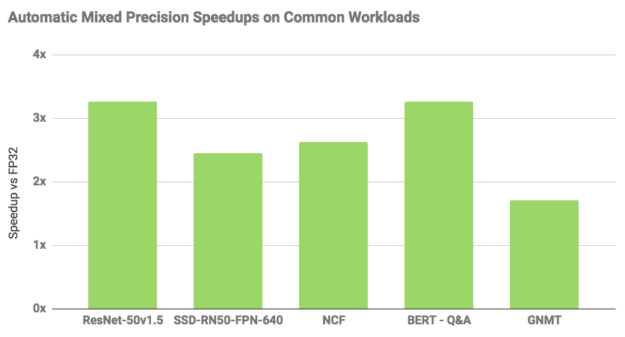
Pretty cool, right? But if you reduce the bits, something’s gotta give: in this case, FP16 could only represent a small range of numbers compared to FP32. Regardless, mixed precision training worked, but it was delicate and NaNs could pop up if you weren’t careful — ask me how I know!
Eventually, BFloat16 (where the B stands for Brain, not Big — to my disappointment) was invented, which traded a bit of precision in exchange for having a dynamic range practically equal to FP32.
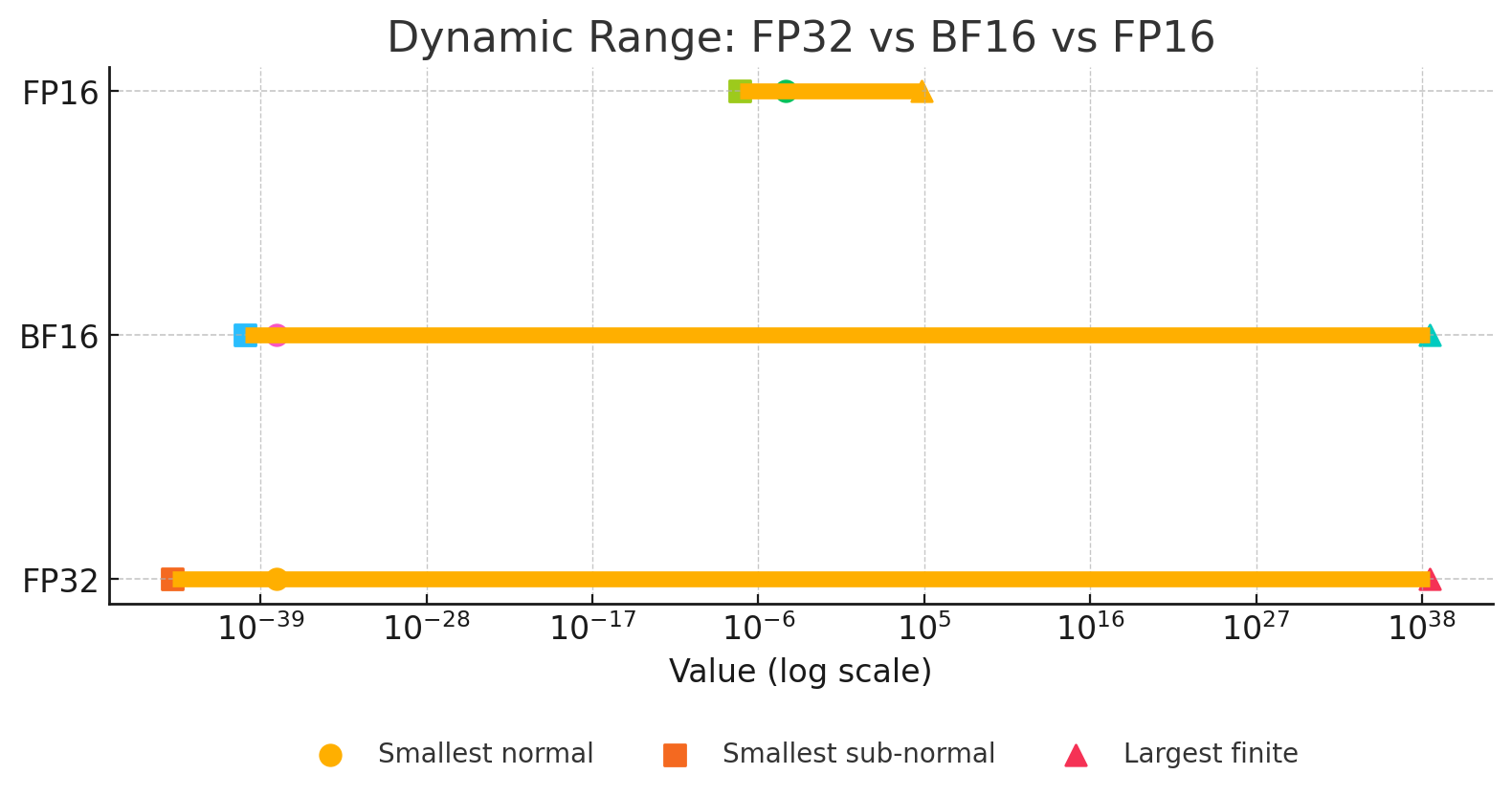
As was discovered, neural nets care much more about dynamic range than raw precision, so now BF16 is the de-facto mixed precision format for deep learning practitioners, as it is the best of both worlds: the dynamic range of FP32 (kind of), and the less bits of FP16.
If you’re training with FP32, you’re either wasting FLOPs, are stuck with pre-Ampere hardware that doesn’t natively support BF16 and your model shits itself with FP16, or have some extreme edge case that doesn’t let you use anything else.
Can we go Lower?
Now, dear reader, I’m pretty sure you’re already familiar with FP8 and 4 for inference. Turns out neural nets are especially tolerant of lower precisions at inference-time with minimal quality loss, especially if you’re using clever tricks.
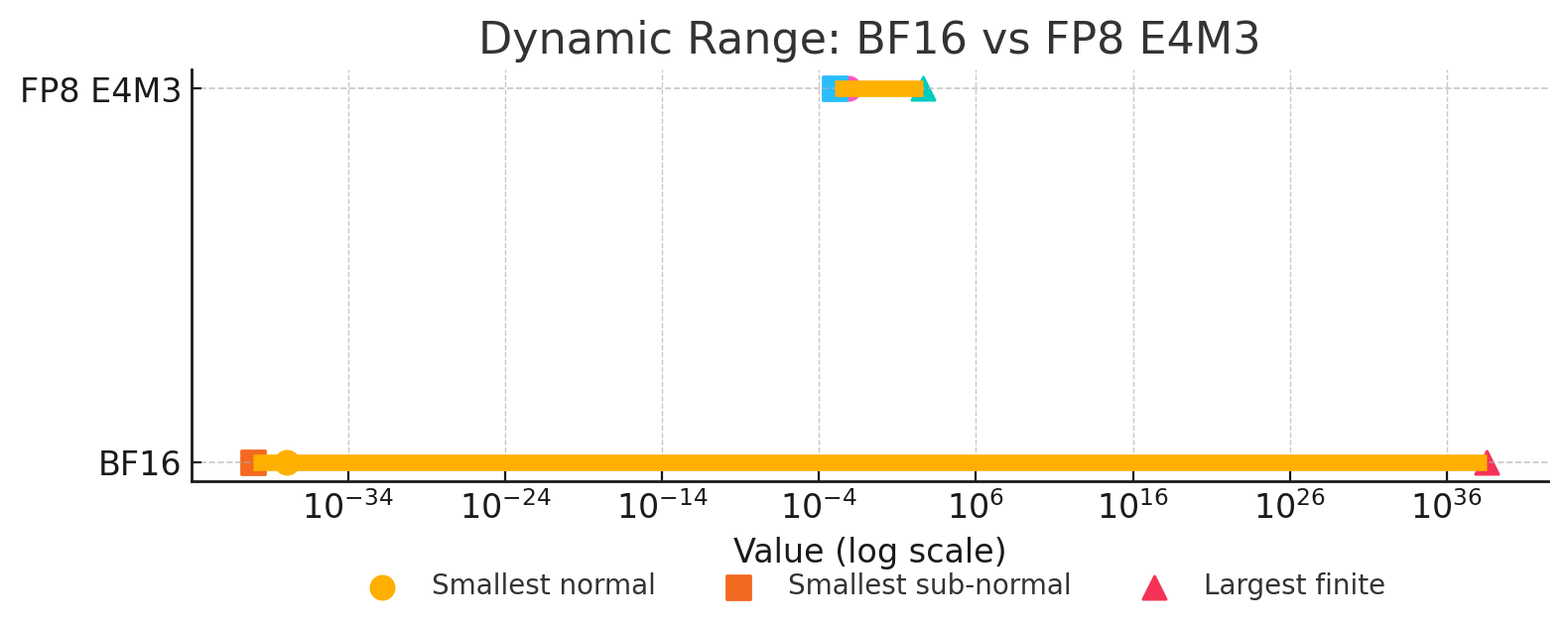
But what if we’re calculating losses and making backwards passes? Now that’s a bit more complicated. As a result, the field of FP8 training, as of late June 2025, is still experimental, only really explored in practice by DeepSeek, where due to export restrictions are forced to innovate ways to squeeze every last FLOP out of their H800s.
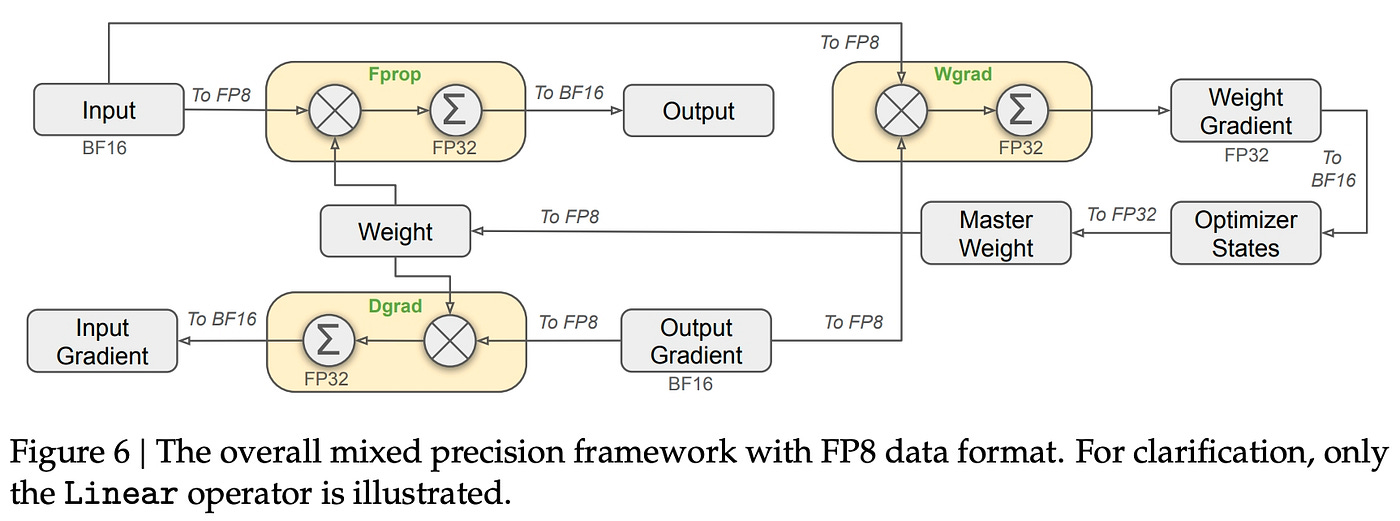
American labs, saturated by cheap GPUs and VC money, would much rather just shovel in more compute than go below the tried and tested BF16. But that doesn’t mean some people haven’t seriously explored it: both Meta and IBM have confirmed it is possible, stable, and yields a formidable speedup.
Meet TransformerEngine
Transformer Engine is a thing made and released by NVIDIA made to accelerate model, mainly Transformer, training. Among its features are attention kernels, fused LayerNorm, et al. but its most important one here is FP8 Training.
For reference, when mentioning FP8, I mean there are two main variations:1
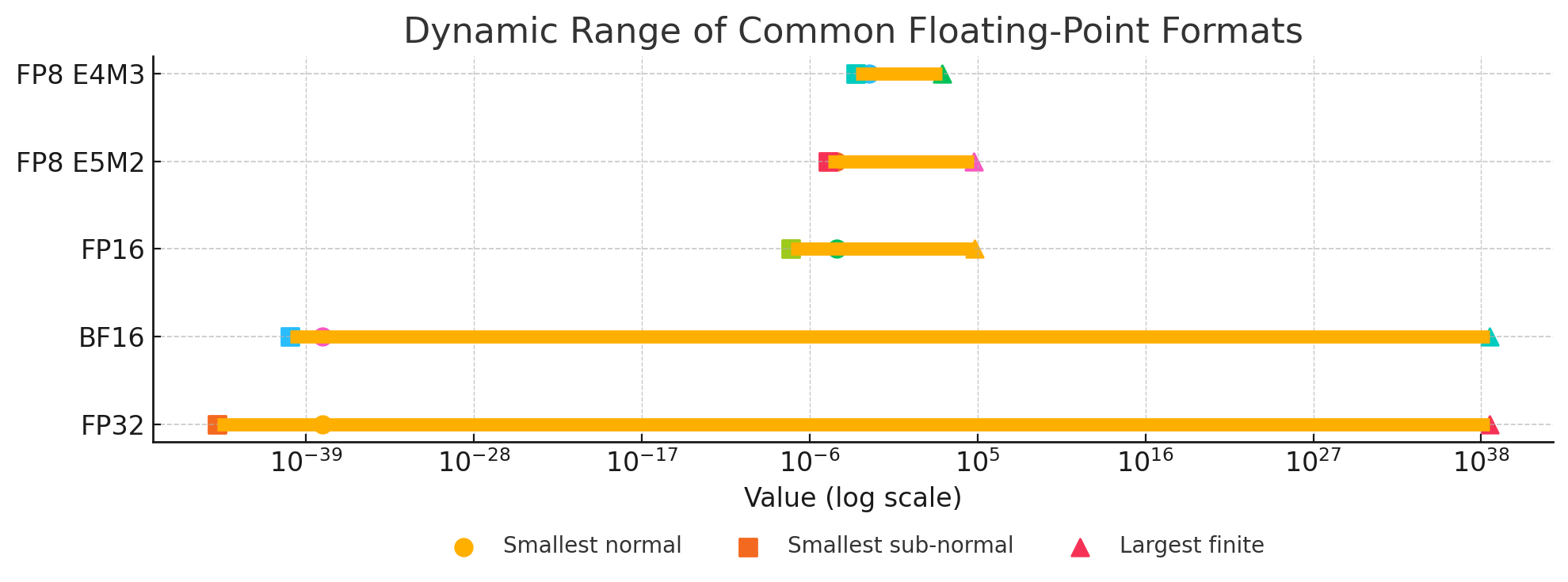
E4M3 - 1 sign bit, 4 exponent bits and 3 bits of mantissa. It can store values up to +/-448 and
nan.E5M2 - 1 sign bit, 5 exponent bits and 2 bits of mantissa. It can store values up to +/-57344, +/-
infandnan. The tradeoff of the increased dynamic range is lower precision of the stored values.
TransformerEngine switches between the two depending on which one it finds more convenient for the task, so we that we don’t have to think about it, while maintaining critical bits in BF16 or FP32 because FP8 naively everywhere is bad.
There’s more to talk about, like what the fuck are exponent and mantissa bits and yada yada, but this is supposed to be a super quick primer for those unfamiliar with it. Go read documentation if you want to know more.
Transformer Engine on ROCm: Practical Experience
Now, AMD, not wanting to be outdone, also has its own TransformerEngine implementation. We’ll explore the experience and performance gains.
Installation
With ROCm 6.4 and the Docker container rocm/pytorch:rocm6.4_ubuntu22.04_py3.10_pytorch_release_2.6.0, installing it was as simple as cloning the repo and following the instructions. After running the pip install command, I waited 8 and a half hours for everything to compile… wait, 8 hours, that sounds like a lot, doesn’t it? I’m on an 1xMI300X VM — courtesy of Hot Aisle — with 12 threads, and compiling this thing from scratch also involves compiling a lot of GPU kernels.
I only encountered one issue compiling (depfile has multiple output paths), and that was because I had an old version of ninja. Running pip install --upgrade "ninja>=1.11" fixed it.
After that, I ran a few tests and they worked with no issue. Like most of modern AMD’s ROCm stack, it just works. That’s a good thing!
Usage
What I’m most interested in is the FP8 training feature of TE. To do that in PyTorch, you:
import transformer_engine.pytorch as teReplace all
nn.Linearlayers in your model withte.LinearWrap your training loop in
te.fp8_autocast(enabled=True), just like amp.autocastMake sure all the dimensions in your input tensors are divisible by 16
Done! The context manager and classes take care of everything else. Now that we’ve detailed everything, it’s time to go into my tests
Experiment 1: Stacked Linear FFNs on Sine Waves
For my first thingy, I asked o3 to code up a simple net that consists of just feed forward networks from Transformer, and trained it on a generated dataset of sine waves. The objective is to evaluate the performance of just fp8 autocast and the linears.
I have two configurations:
Half saturation: Consumes about 40% of the 192GB of my MI300X’s VRAM with batch_size=16384. Has 24 layers with 4096 dim and 4x expansion; about 3.1B params (you can fit a lot if you omit attention)
Full saturation: Consumes 90% of VRAM: same as half saturation but 48 layers; has 6.2B params
I then trained both configs on FP8 and BF16 precisions for 50 epochs each.
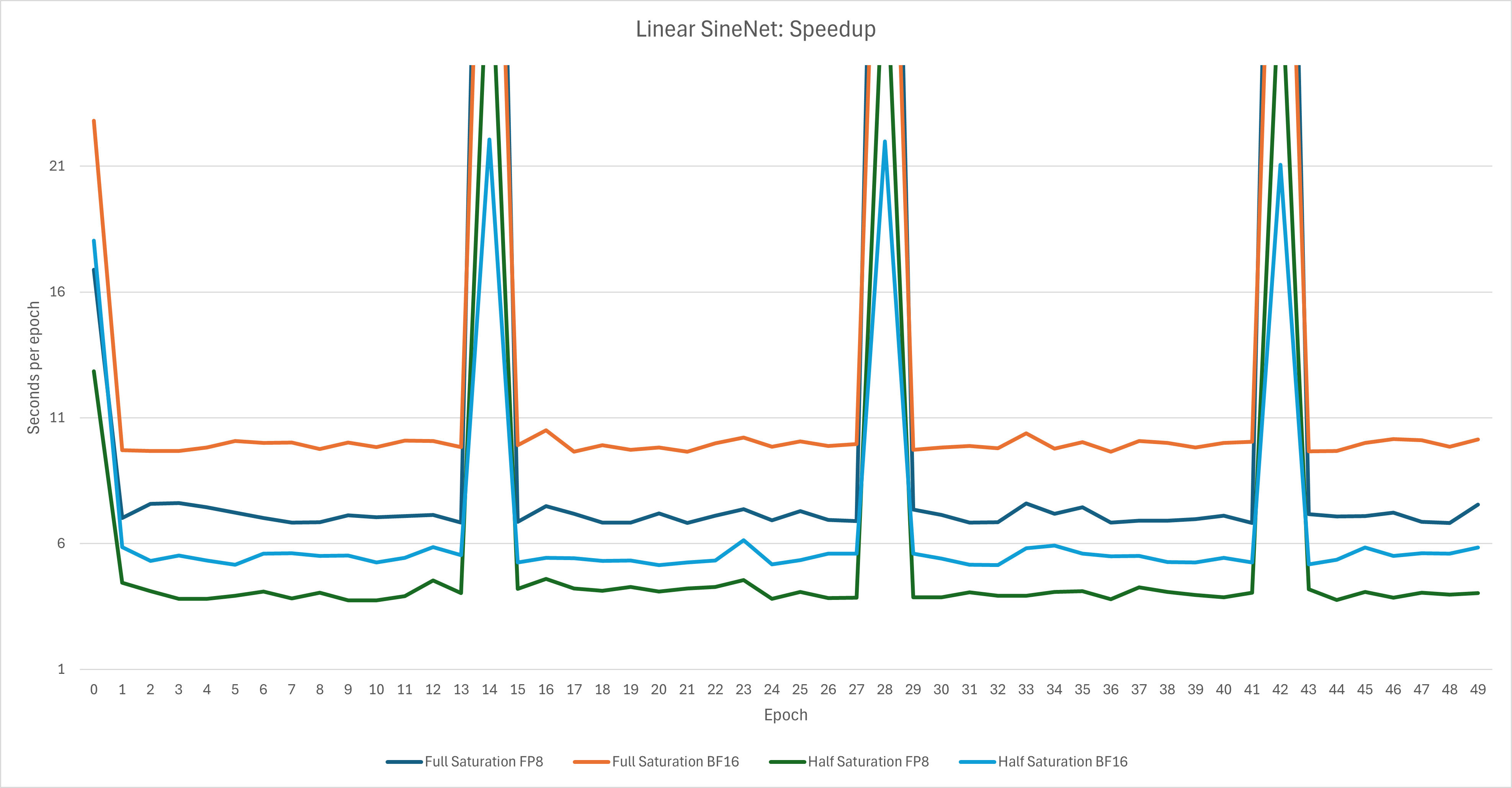
For an easier to read chart:
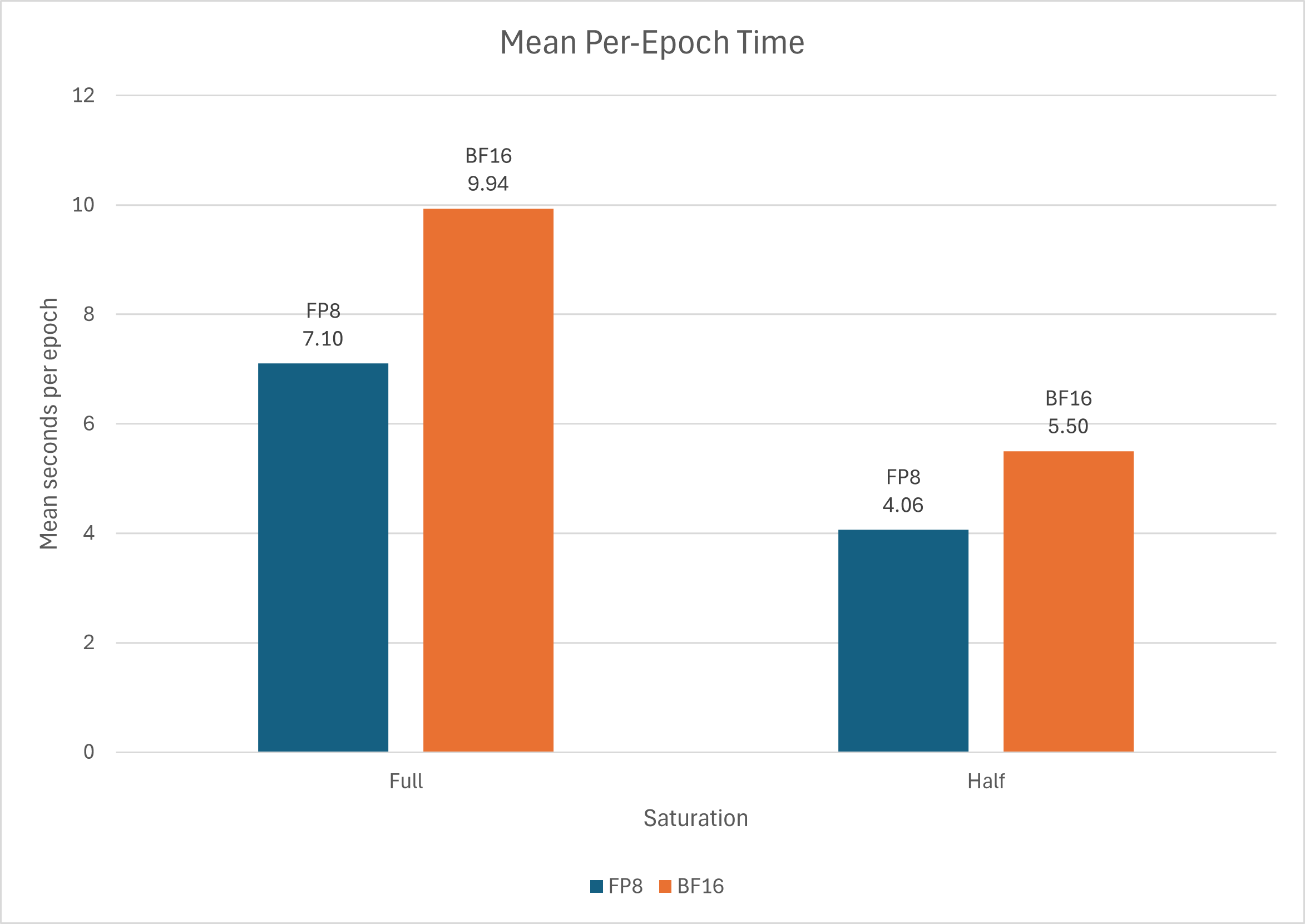
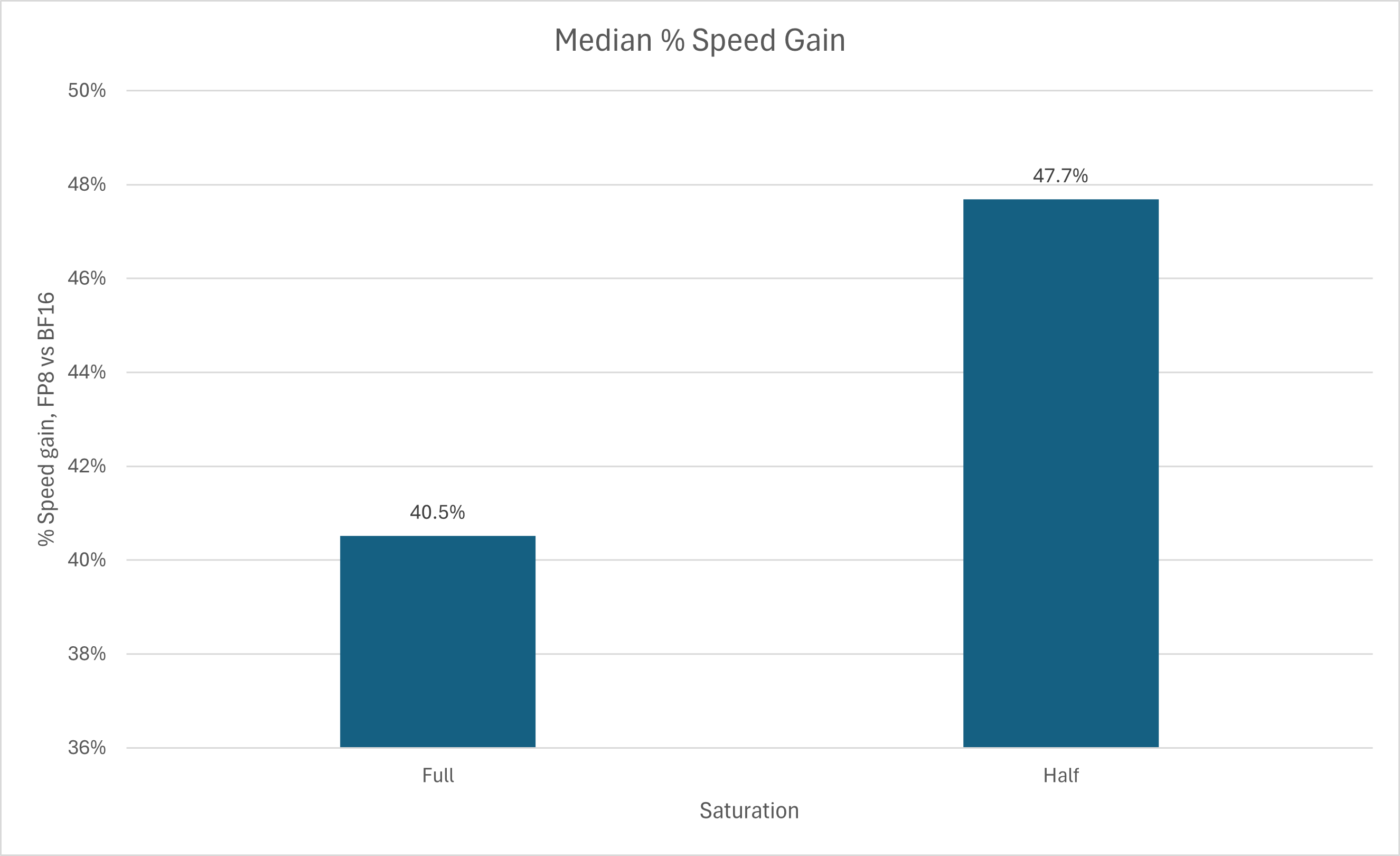
We can see that in this purely synthetic scenario, the speedup is a pretty formidable 40-50%, in line with what the Meta literature said. But while I heard that FP8 training saves on memory, in this case I observed the inverse: using FP8 for training actually increased VRAM usage
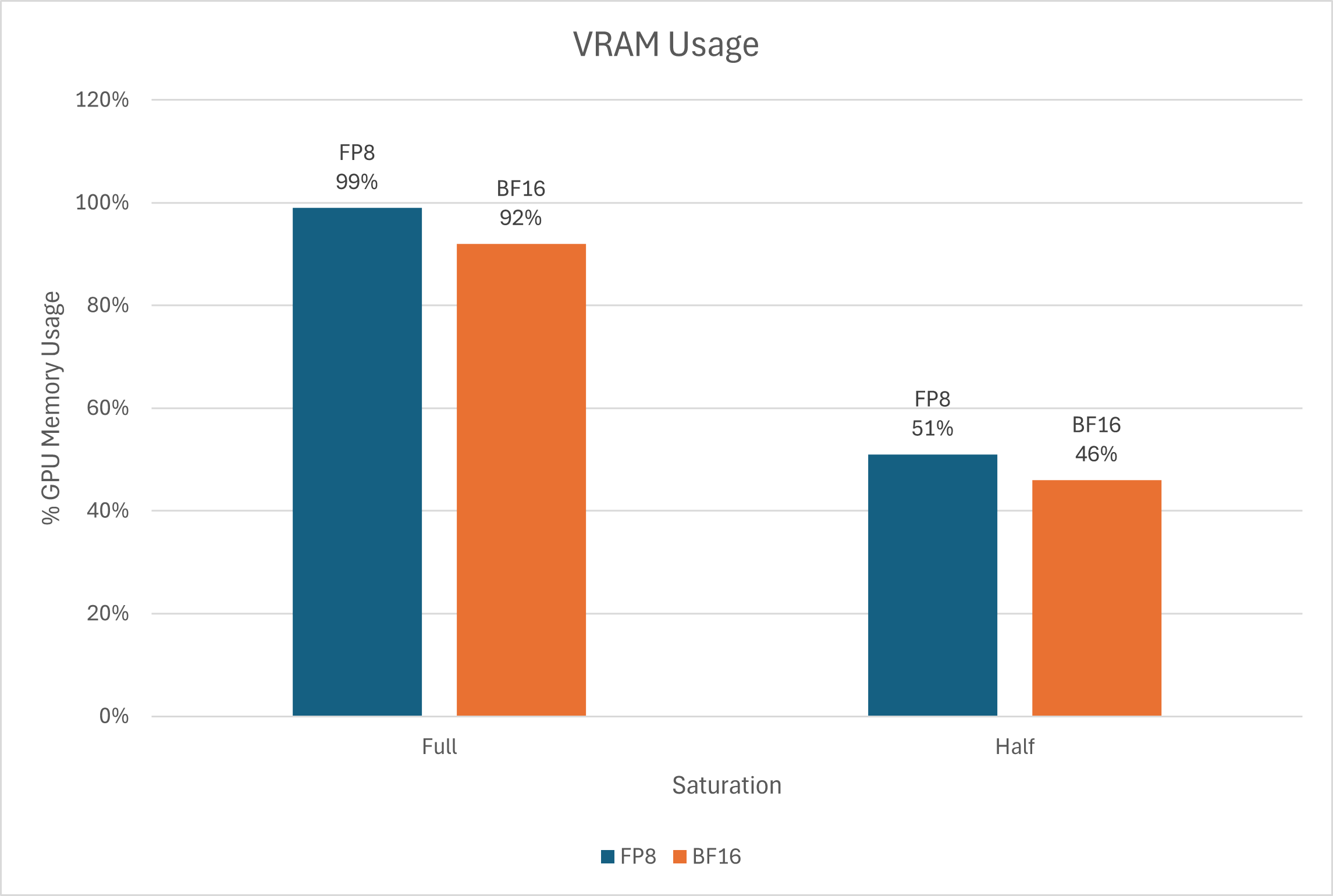
Anyway, there was a slight difference in the loss, but I’m not putting that here, as in practice you’d never try to fit sine waves on a model that has 3-6B parameters of Linear→GELU→Linear→LayerNorm layers.
Instead, I have a practical benchmark:
Experiment 2: 1000 iterations of GPT-2-124M
Now, it’s time for something more real-world-ish. Let’s (kind of) reproduce GPT-2. I took karpathy’s nanoGPT, added Transformer Engine, and changed the hparams as follows:
Batch size 64 with block size 1024, to occupy ~60% of VRAM on a single MI300X
Turned off torch.compile for fairness
Enabled bias in LayerNorm (as TransformerEngine LayerNorm doesn’t support bias off)
Then, I ran it in three configurations
BF16: Normal nanoGPT with BF16 autocast and vanilla PyTorch layers.
FP8: nanoGPT with te.Linear layers in both FFN and Attention, and FP8 autocast, but everything else (SDPA, LayerNorm) remains the same
FP8-TE2: Taking the above, replacing LayerNorm with te.LayerNorm and replacing the call to PyTorch’s scaled dot product attention with Transformer Engine’s
Though an obligatory disclaimer: Transformer Engine does offer fused LayerNorm-Linear and even LayerNorm-FFN classes, but I chose not to use those as this is not only a benchmark, but also for me to figure out if FP8 training can fit my own use case. I’m avoiding fused classes because I want to maintain full torch.load_state_dict compatibility with vanilla PyTorch.
Then I ran all of them on the same hparams for 1000 iterations on the OpenWebText dataset. Here’s what I found.
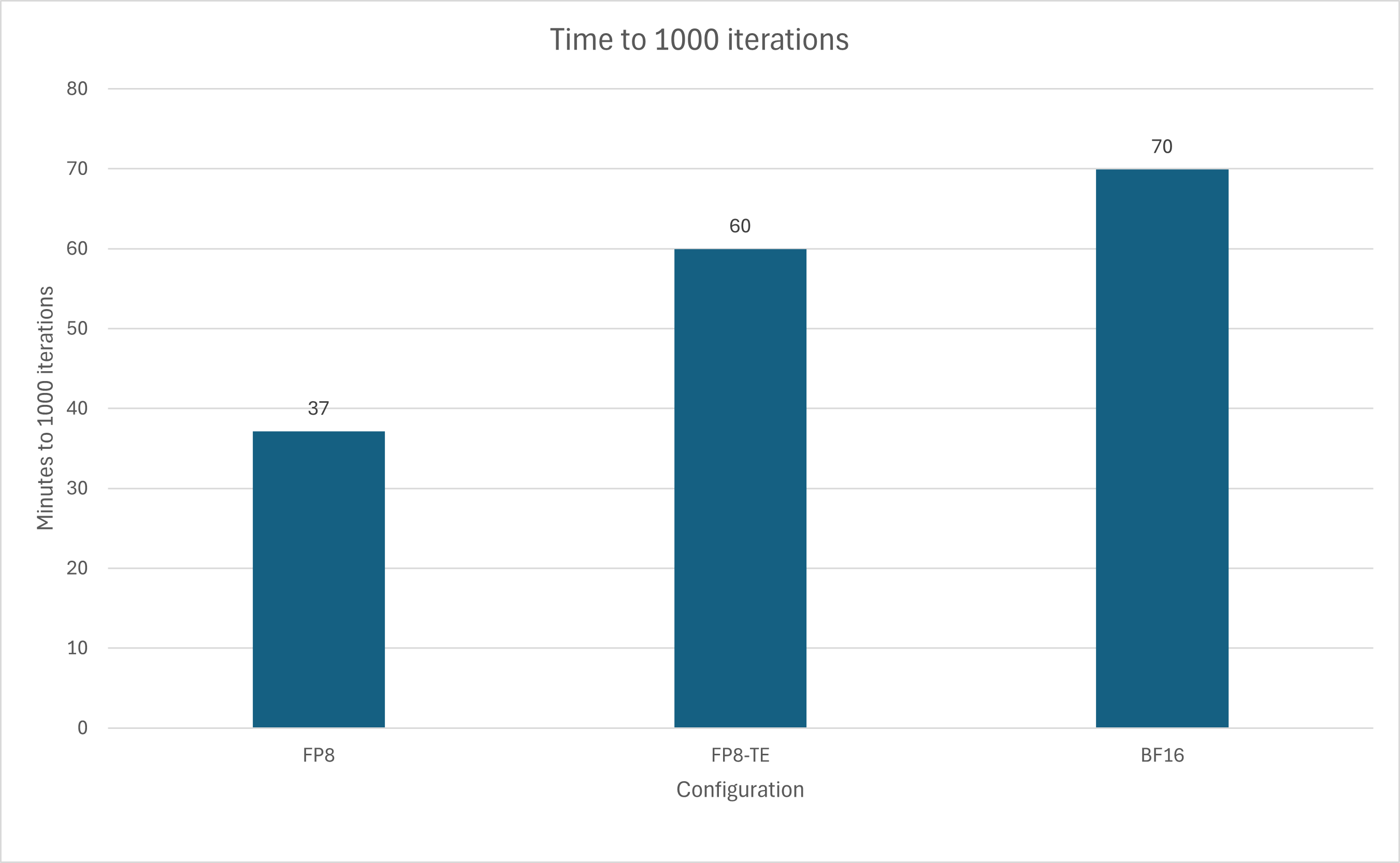
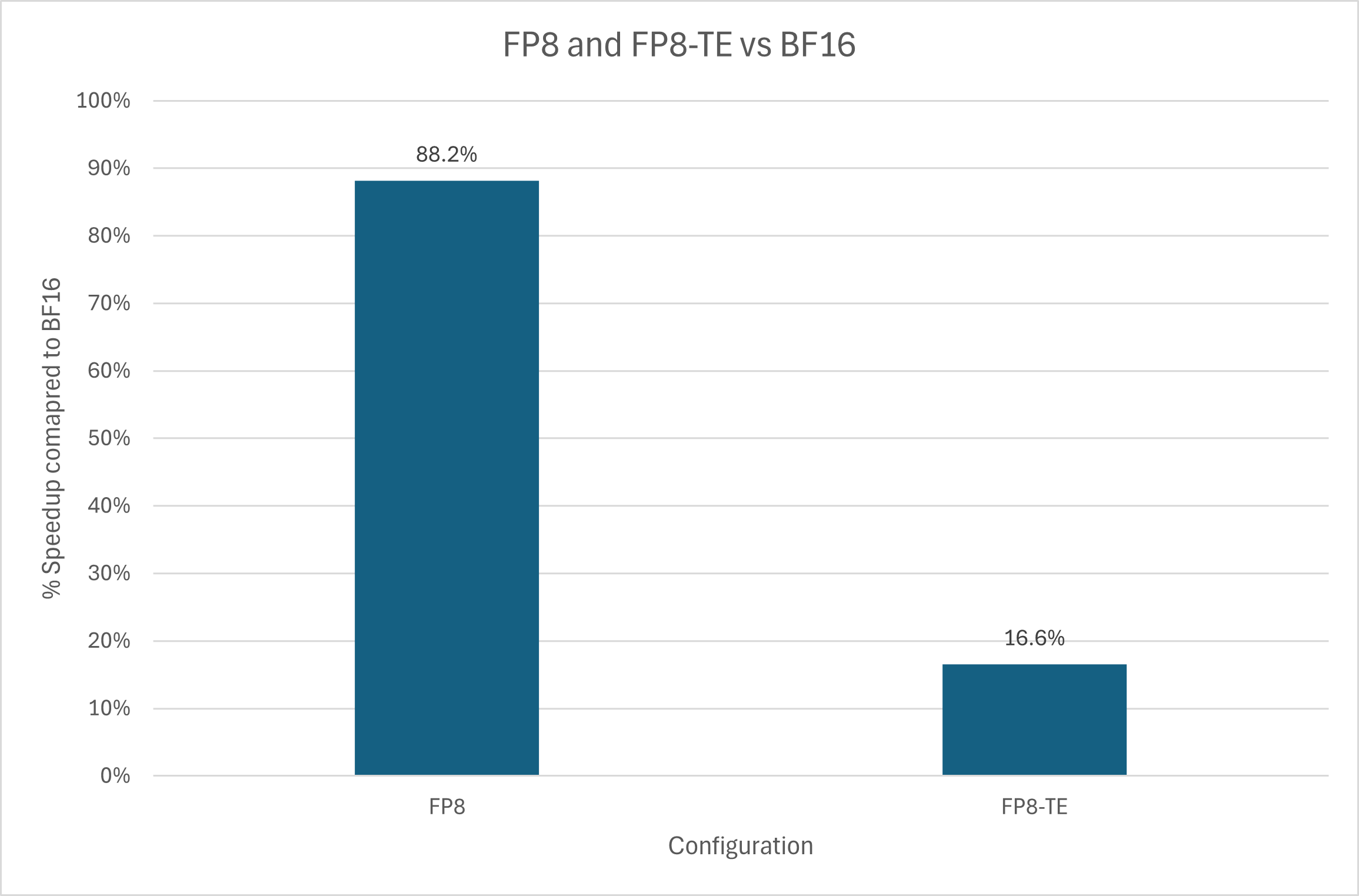
Using FP8 autocast alone led to an 88% increase in speed, while full Transformer Engine eliminated most, if not all, of the gains.
But is it numerically stable? After all, not much value to faster training if it kills your losses.
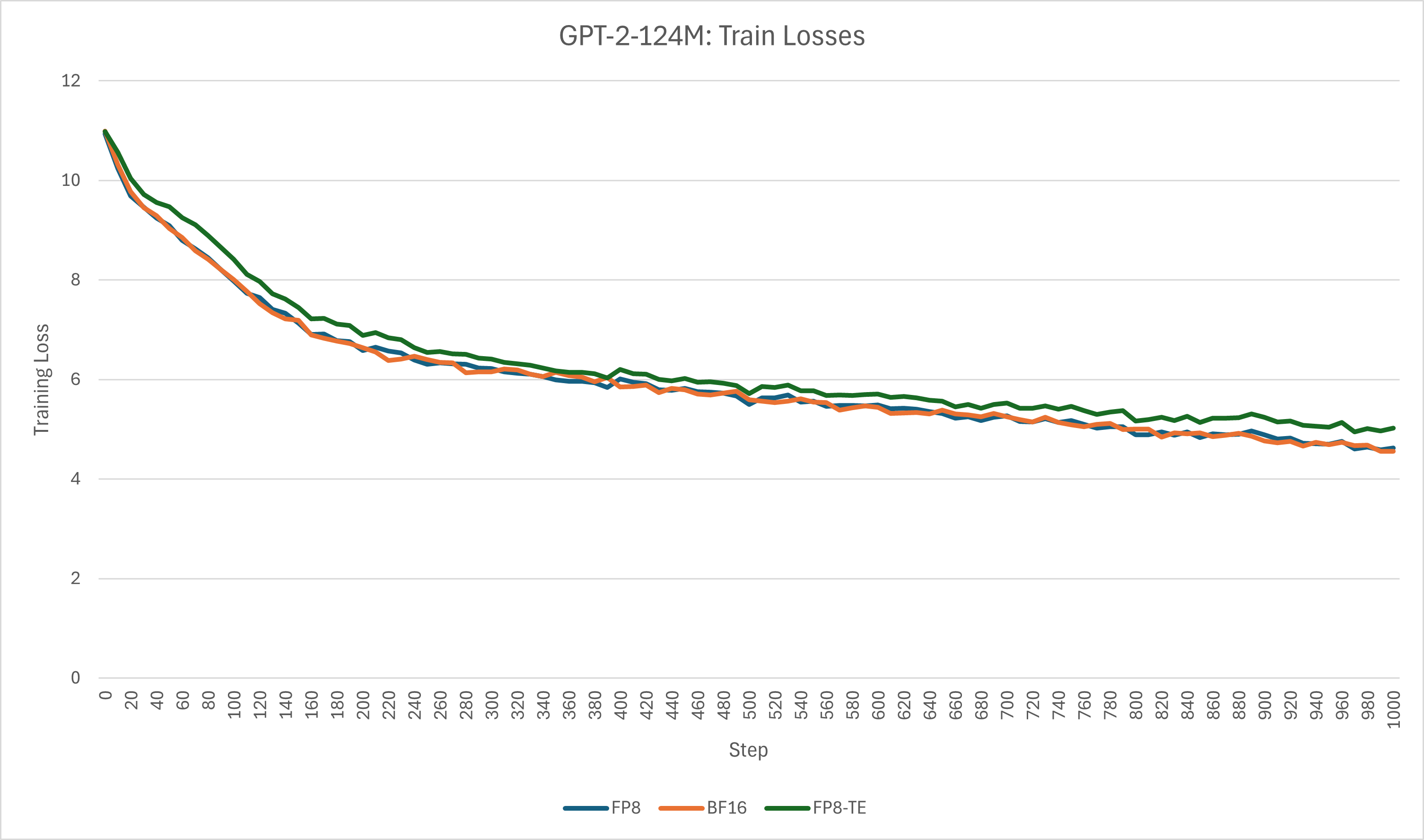
Turns out, yes, FP8 training can maintain practically equivalent losses to BF16, proving that the autocast strategy is good at making things faster while keeping things stable.
But what about mid-training memory usage?
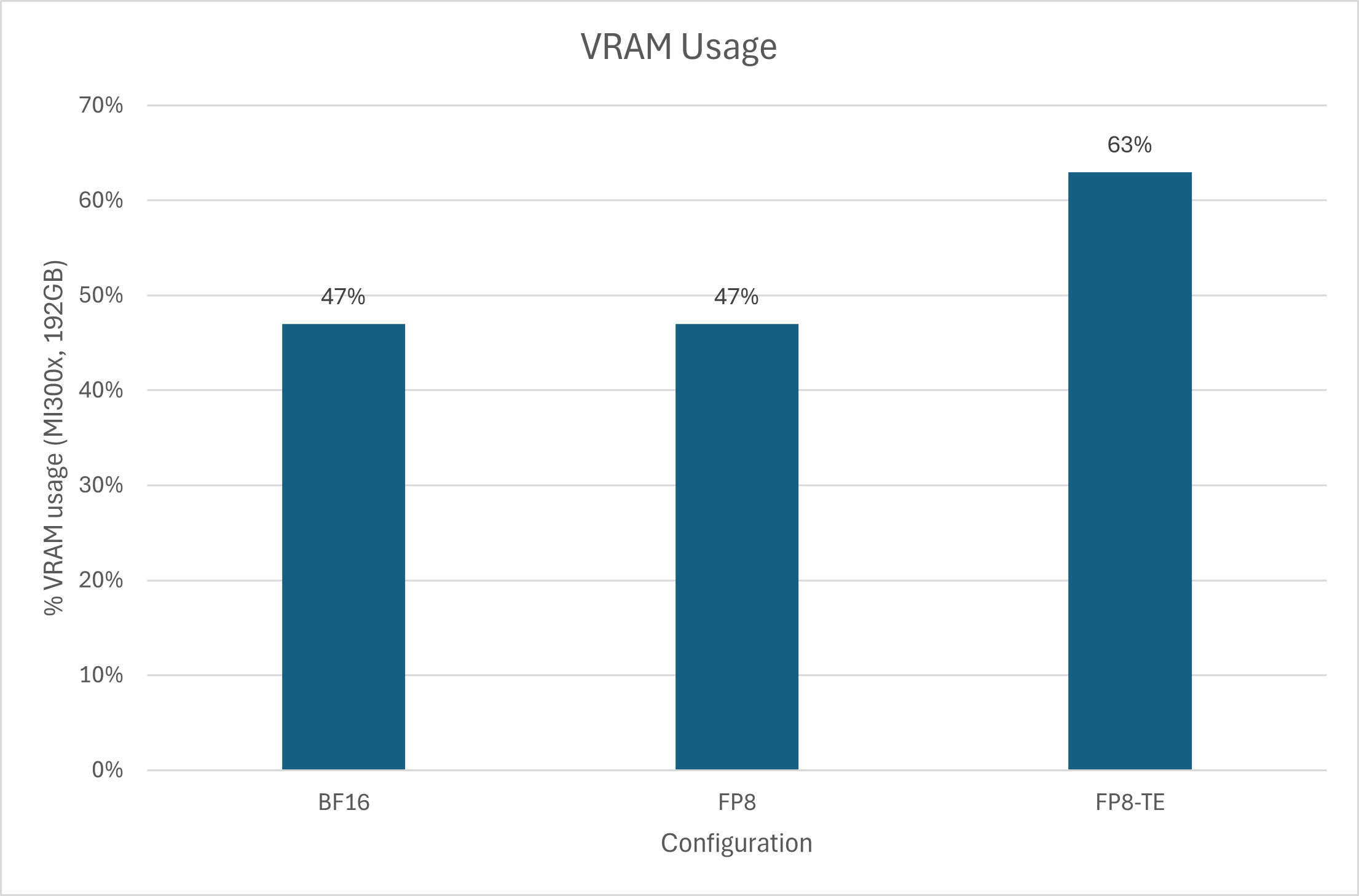
Unlike last example, FP8 autocast doesn’t increase memory usage, but is dead even with BF16. Using full Transformer Engine increases it… why?
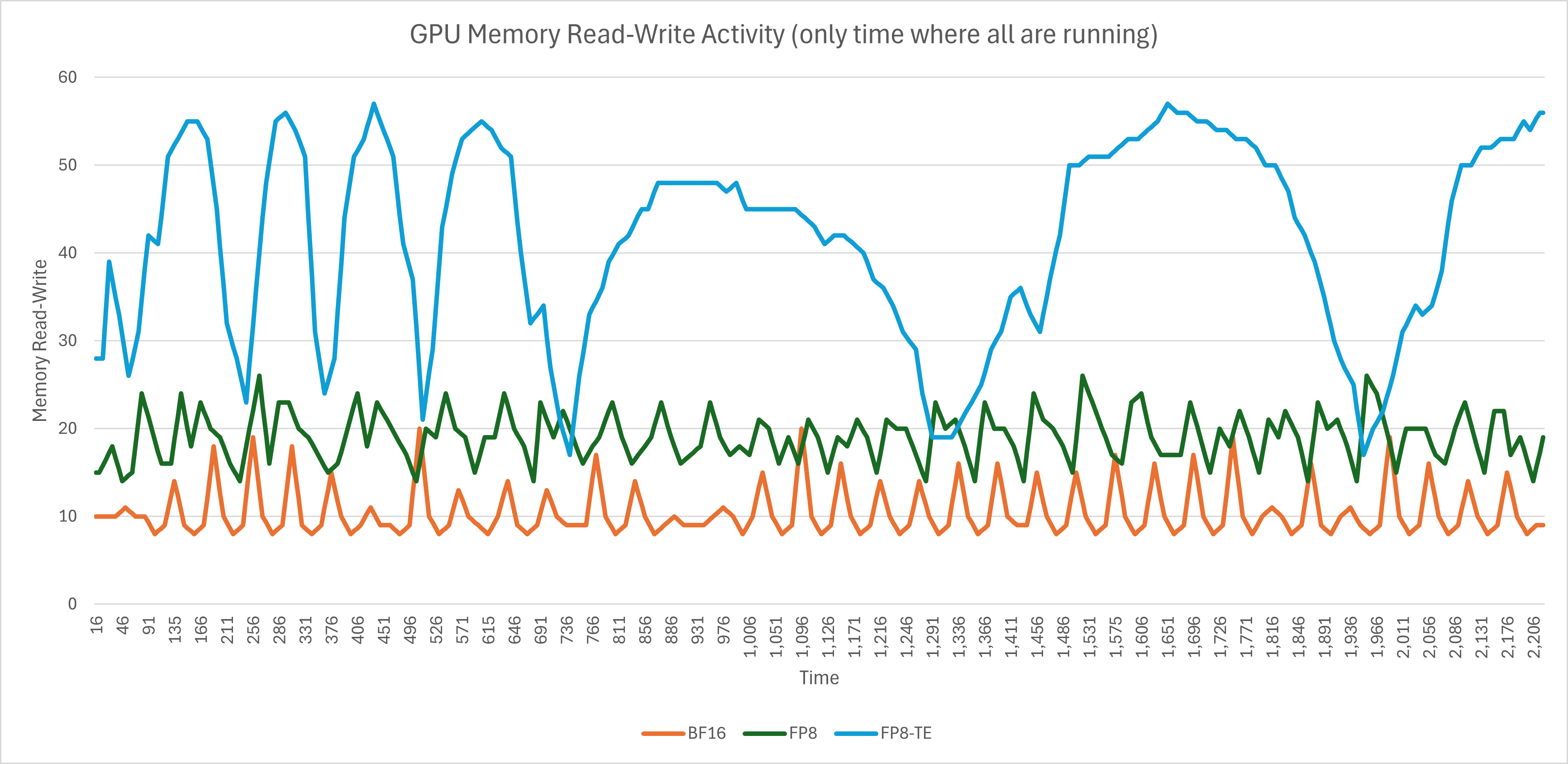
It seems that the process with FP8 and Transformer Engine spends a lot more time dicking around in HBM, which would explain the slowdown.
Therefore, out of that, I had a feeling: that sounds a lot like an underperforming attention kernel. So, I took the FP8-TE config, reverted the attention module to the FP8 config (which uses te.Linear for the projections but PyTorch scaled_dot_product_attention for the calculation itself), and left only TE’s LayerNorm.
The new configuration, FP8-TE-LNOnly, completed in 36.65 minutes, faster than FP8 only’s 37.15, gaining a 2% speedup.
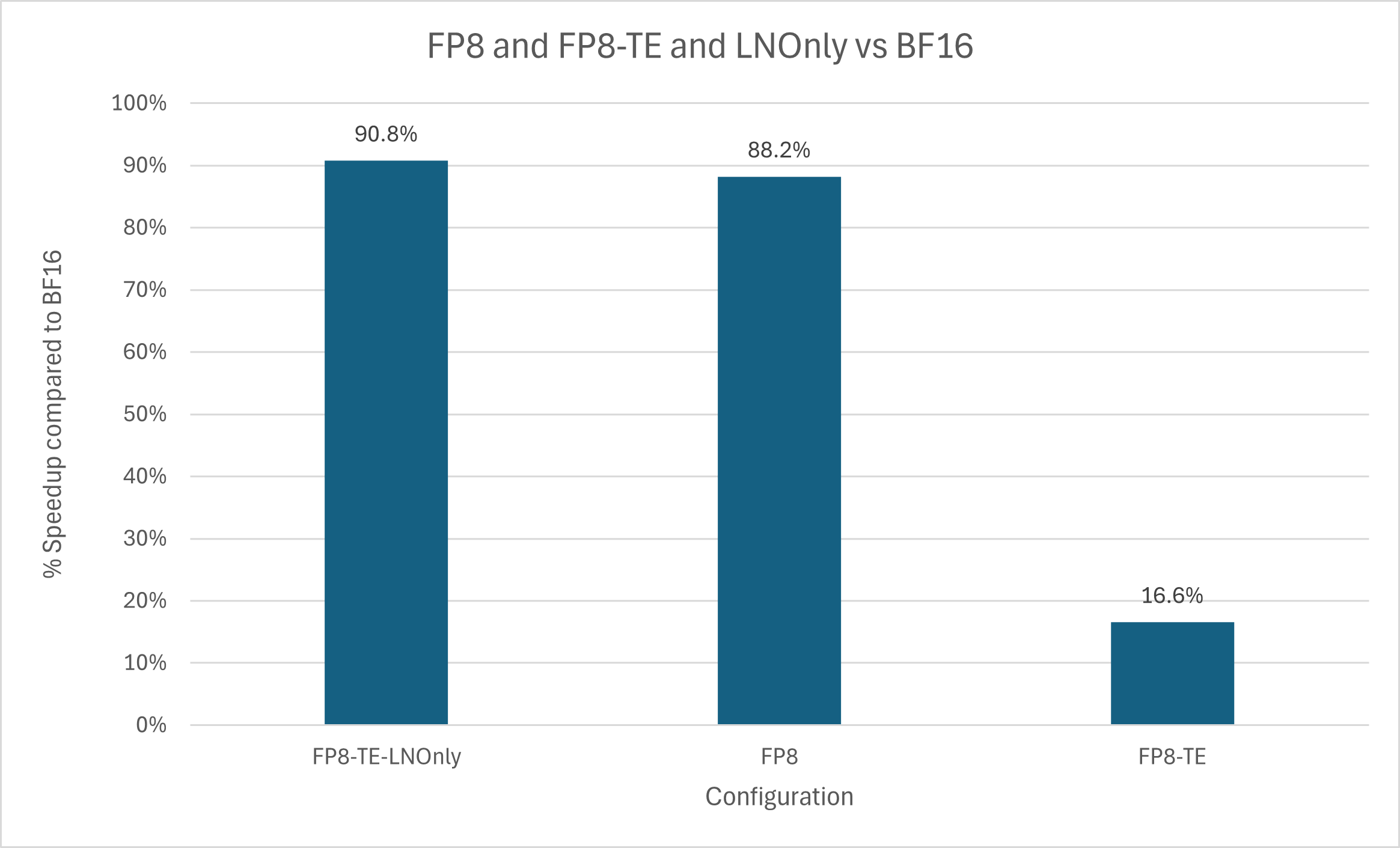
Clearly, whatever attention kernel ROCm’s Transformer Engine ships with is either broken or inferior to Torch 2.6’s SDPA, which does include a Flash Attention kernel of its own in both CUDA and ROCm releases. Doesn’t really matter to me since I prefer FlexAttention (I’m an ALiBi enjoyer), but there you have. In all other metrics, this new config performed identically to FP8 only, so no reason to re-chart everything.
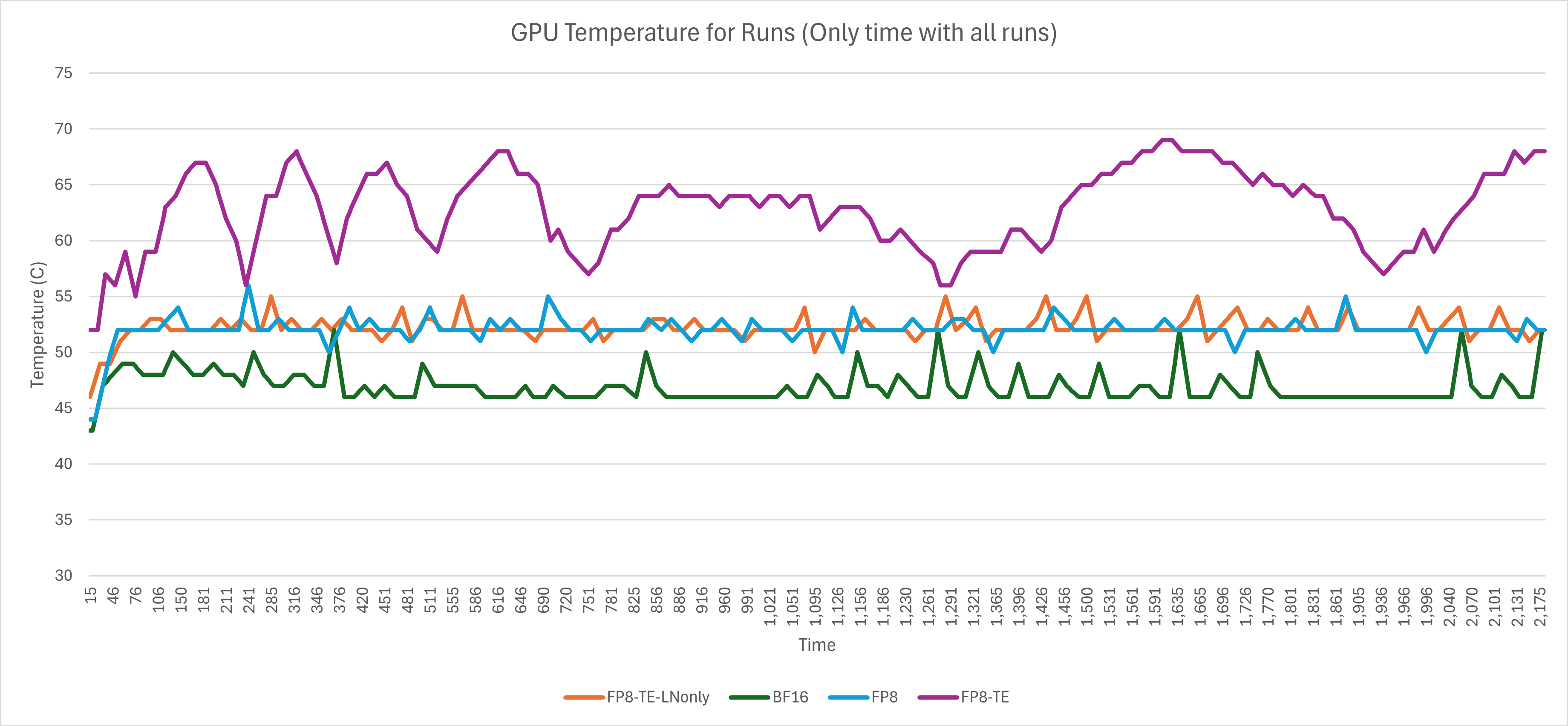
Interestingly enough, we can see the memory accesses directly result in the FP8-TE config making the GPU toastier. Proving that hotter GPU != more performance, or useful work at all.
Conclusion
We’ve gone over what is mixed precision, why use it, and how to go beyond 16-bit and into 8, and how to do it on AMD server GPUs.
So, can we do FP8 training on ROCm, and is it viable? Yes, with Transformer Engine, but only on MI300(X) for now, and don’t use its attention kernel. You’ll get a good speedup with minimum complexity, as autocast handles the tedious bits for you.
Limitations
All this testing was done on a single GPU virtual machine, running for an hour max, and on a relatively small model. In practice you’d be doing multi-GPU and multi-node and leaving a training job running for days if not weeks — that I haven’t tested. Maybe I will one day.
Thanks Hot Aisle and AI at AMD for the MI300X GPU time.
I don’t know what I’m doing! Wait, I’m a ROCm star, so maybe I do…
Using the env variables NVTE_USE_CAST_TRANSPOSE_TRITON=1, NVTE_USE_LAYERNORM_TRITON=1, and NVTE_USE_RMSNORM_TRITON=1 to make it prioritize Triton kernels
Hello. Thanks for trying Transformer Engine on ROCm. The reason why fp8 training used more memory is that it still keeps the master weights in fp32 or bf16 while it also maintain fp8 weights and (sometimes even its transpose).
I am surprised to see that when you were seeing slower speed up when using full TE than only using TE Linear. Could you open an issue here (https://github.com/ROCm/TransformerEngine/issues) and provide a reproducer?